What is system development life cycle (SDLC)? Explain each phase of SDLC in detail
System analysis and design are the complex, challenging, and simulating organization processes that a team of business and system professionals uses to develop and maintain computer-based information systems. It is an organizational improvement process. Information systems are built and rebuilt for their benefit.
Phases of SDLC:
When developing the information system, most organizations use a standard set of steps called the system development life cycle (SDLC).
It includes Five phases: Planning, Analysis, Design, Implementation, and Maintenance.

1. Planning :
This phase begins after the project has been defined and appropriate resources have been committed. The first part of this phase involves collecting, defining, and validating functional, support, and training requirements. The second portion is developing initial life cycle management plans, including project planning, project management, Configuration Management (CM), support, operations, and training management. We cannot just go and build the system.
2. Analysis:
System requirements are studied and structured in this phase. System analysts collect facts from existing system users in order to develop limitations and details. They will also define new system objectives. They use different data-gathering techniques such as interviews, observations and surveys. This is an attempt to understand all aspects of the current system and eventually indicate how things may be improved by a new system.
3. Design:
Describes how the system will fulfill the user requirements. To achieve this, the logical and physical design must be created. The logical design produced during the analysis is turned into a physical design – a detailed description of what is needed to solve original problem. Input, output, databases, forms, codification schemes, and processing specifications are drawn up in detail. In the design stage, the programming language and the hardware and software platform in which the new system will run are also decided. The data structure, control process, equipment source, workload and limitation of the system, Interface, documentation, training, procedures of using the system, taking backups, and staffing requirements are decided at this stage.
4. Implementation:
This is followed by testing and then implementation. During this phase, the new or enhanced system is installed in the production environment, users are trained, data is converted, the system is turned over to the sponsor, and business processes are evaluated. This stage includes efforts required to implement, resolve system problems identified during the implementation process, and plan for sustainment. Coding – the physical design specifications are turned into working computer code. Integration and Testing– a testing environment is created where all components are brought together. Installation – here the new system is rolled out.
5. Maintenance:
After the user acceptance of the new system is developed, the implementation phase arises. Implementation is the stage of a project during which theory is turned into practice.
The major steps involved in this phase are:
- Acquisition and Installation of Hardware and Software
- Conversion
- User Training
- Documentation
Assume monetary benefits of an information system of $70,000 the first year and increasing benefits of $10,000 a year for the next four years, one-time development costs of $90,000, and recurring costs of $40,000 per year over the duration of the system’s life. The discount rate for the company was 1! percent. Using a five-year time horizon, calculate the net present value of these costs and benefits. Also, calculate the overall return on investment and then present a breakeven analysis. At what point does breakeven occur?
Now let’s calculate the present value of the costs:
Year 1: ($90,000 + $40,000) / (1 + 0.01)1 = $129,300
Year 2: $40,000 / (1 + 0.01)2 = $39,560
Year 3: $40,000 / (1 + 0.01)3 = $38,765
Year 4: $40,000 / (1 + 0.01)4 = $37,928
Year 5: $40,000 / (1 + 0.01)5 = $37,141
The present value of the costs is $243,694
To calculate the NPV, we subtract the present value of the costs from the present value of the benefits:
NPV = $423,294 – $243,694 = $179,600
To calculate the return on investment (ROI), we divide the NPV by the development costs and multiply by 100%.
ROI = ($179,600 / $90,000) * 100% = 199.55%
To perform a breakeven analysis, we need to determine how long it takes for the benefits to equal the costs. We can do this by setting up the following equation:
$70,000 + $10,000x = $90,000 + $40,000x
Where x is the number of years.
Solving for x, we get:
x = $90,000 / $30,000 = 3 years
This means that it will take 3 years for the benefits to equal the costs, so the breakeven point occurs at the end of the 3rd year.
What is conceptual data model? How do you gather information for conceptual data modeling?
Draw ab ER diagram for a retail store in a mall which sells different items to its customers.
Draw ab ER diagram for a retail store in a mall which sells different items to its customers.
A Conceptual Data Model is an organized view of database concepts and their relationships. The purpose of creating a conceptual data model is to establish entities, their attributes, and their relationships. At this data modeling level, there is hardly any detail available on the actual database structure. Business stakeholders and data architects typically create a conceptual data model.
The 3 basic tenants of the Conceptual Data Model are
- Entity: A real-world thing
- Attribute: Characteristics or properties of an entity
- Relationship: Dependency or association between two entities
Characteristics of a conceptual data model:
- Offers Organisation-wide coverage of the business concepts.
- This type of Data Model is designed and developed for a business audience.
- The conceptual model is developed independently of hardware specifications like data storage capacity, and location, or software specifications like DBMS vendor and technology. The focus is to represent data as a user will see it in the “real world.”
The ER diagram for a retail store in a mall that sell different items to its customer is

What is system analysis and design? Why is it important for developing information systems?
Systems Analysis
It is a process of collecting and interpreting facts, identifying the problems, and decomposition of a system into its components. System analysis is conducted for the purpose of studying a system or its parts in order to identify its objectives. It is a problem solving technique that improves the system and ensures that all the components of the system work efficiently to accomplish their purpose. Analysis specifies what the system should do.
Systems Design
It is a process of planning a new business system or replacing an existing system by defining its components or modules to satisfy the specific requirements. Before planning, you need to understand the old system thoroughly and determine how computers can best be used in order to operate efficiently. System Design focuses on how to accomplish the objective of the system.
It is important for developing information system because:
-
Enabling comprehension of complicated structures
-
Allowing for better management of any business changes
-
Aligning the organization with its environment and strategic priorities
-
Minimizing IT issues and reducing the workload of IT employees
-
Reducing costs in certain areas, saving the organization money and resources for use in other departments
-
Identifying potential risks and threats to the processes before they arise
-
Improving the overall quality of the system
-
Improving the usability of the system by employees
-
Increasing productivity and customer satisfaction
Why do we need CASE tool during system development? What are different components of
CASE tool?
CASE tool?
we need CASE tool during system development because:
- As the special emphasis is placed on the redesign as well as testing, the servicing cost of a product over its expected lifetime is considerably reduced.
- The overall quality of the product is improved as an organized approach is undertaken during the process of development.
- Chances to meet real-world requirements are more likely and easier with a computer-aided software engineering approach.
- CASE indirectly provides an organization with a competitive advantage by helping ensure the development of high-quality products.
Types of CASE Tools:
- Diagramming Tools:
It helps in diagrammatic and graphical representations of the data and system processes. It represents system elements, control flow and data flow among different software components and system structures in a pictorial form. For example, Flow Chart Maker tool for making state-of-the-art flowcharts. - Computer Display and Report Generators: These help in understanding the data requirements and the relationships involved.
- Analysis Tools: It focuses on inconsistent, incorrect specifications involved in the diagram and data flow. It helps in collecting requirements, automatically check for any irregularity, imprecision in the diagrams, data redundancies, or erroneous omissions.
For example:- (i) Accept 360, Accompa, CaseComplete for requirement analysis.
- (ii) Visible Analyst for total analysis.
- Central Repository: It provides a single point of storage for data diagrams, reports, and documents related to project management.
- Documentation Generators: It helps in generating user and technical documentation as per standards. It creates documents for technical users and end users.
For example, Doxygen, DrExplain, Adobe RoboHelp for documentation. - Code Generators: It aids in the auto-generation of code, including definitions, with the help of designs, documents, and diagrams.
What is project management? Explain some activities and skills of a project manager.
Project management is the process of scoping, planning, staffing, organizing, directing, and controlling the development of an acceptable system at the minimum cost and within a specified time.
Project managers require a variety of skills to be able to effectively do their jobs and ultimately benefit both their respective organizations and project stakeholders. These capabilities can be gleaned from experience and take years to master. However, they offer great benefits that could significantly contribute to managers’ career development. The following are some of the best project management skills that project managers should possess:
1. Leadership:
The issue of project leadership has always been and always will be a focal point among businesses. This is why it is undoubtedly at the top of a project manager’s most important skills. This skill enables project managers to come up with corporate visions and lead teams effectively. Boosting this skill will greatly improve the project managers’ career advancement.
2. Communication:
Communication goes hand-in-hand with leadership skills. To be an effective leader, one has to be able to make clear what project teams must do. However, communication is not limited to the project team, it also applies to all stakeholders, including vendors, contractors, and customers. Such can be done through the use of technologies such as reporting tools, chat or file sharing. Such tools facilitate person-to-person and group communication alike.
3. Scheduling Capability:
Another one of the project manager’s most important skills is the ability to create project schedules that cannot be undermined. However, it has been established that many project managers are lacking in this skill, an area where improvements are greatly needed.
4. Risk Management:
The proliferation of unique projects has resulted in project managers becoming more adept at risk management. Unlike common projects, which are often outsourced or assigned to less seasoned project managers, these unique undertakings entail more complicated efforts that only mature project managers are capable of handling. Having this skill is a sign of having control over your project. Besides, it’s an effective way of assuring project sponsors that their investments are in good hands.
5. Negotiating:
Project managers who have excellent negotiating skills are likely to resolve conflicts that may arise among project stakeholders. This could lead to the formulation of ideal scenarios that could prove to be amicable to all concerned.
6. Contract Management:
The ability to manage contracts is very useful in maintaining relationships with suppliers. As every project involves material supply, such skill really comes in handy for project managers. Managing purchases is basically the cream of contract management. As such functions have previously been handled by finance departments, relegating it to project managers makes the process much simpler.
7. Team Management:
Needless to say, most members of project teams need guidance from project managers and the most effective way to do this is by coaching. Having this skill will enable you to make up for employee shortcomings such as inadequate project experience and therefore, need coaching. And besides, coaching has been proven to help students to significantly boost their performance.
8. Cost Management:
An essential project management skill, cost management is of critical importance to most businesses. Failure to comply with this need could hurt organizations that run on tight budgets. Project managers who are knowledgeable in this area can deliver projects not only on time but within the budget as well.
9. Critical Thinking:
It is a fact that critical thinking is the basis of all sound decisions and corporate decisions are no exception to this rule. Project managers who consider the pros and cons of potential answers to specific problems, practice critical thinking. This skill separates those who are adept at managing issues from those who are not. The development of critical thinking skills require practice and tools that can help you logically structure arguments before coming up with a decision.
10. Task Management:
An effective project manager should also be adept at task management. This skill involves the ability to come up with task lists and delegate them while keeping absolute control over the project. To be able to harness this skill, one must learn the process of making lists. Strategies for ensuring that one is constantly on top of such a list should also be developed. This is known to ensure that project completion time is always on time.
Explain the process initialing and planning information system development project in brief.
Many activities performed during initiation and planning could also be completed during the next phase of the SDLC—systems analysis. Proper and insightful project initiation and planning, including determining project scope and identifying project activities, can reduce the time needed to complete later project phases, including systems analysis. For example, a careful feasibility analysis conducted during initiation and planning could lead to rejecting a project and saving a considerable expenditure of resources. The actual amount of time expended will be affected by the size and complexity of the project as well as by the experience of your organization in building similar systems. A rule of thumb is that between 10 and 20 percent of the entire development effort should be expended on initiation and planning. In other words, you should not be reluctant to spend considerable time and energy early in the project’s life in order to fully understand the motivation for the requested system.
Most organizations assign an experienced systems analyst, or team of analysts for large projects, to perform project initiation and planning. The analyst will work with the proposed customers—managers and users in a business unit—of the system and other technical development staff in preparing the final plan. Experienced analysts working with customers who well understand their information services needs should be able to perform a detailed analysis with relatively little effort. Less experienced analysts with customers who only vaguely understand their needs will likely expend more effort in order to be certain that the project scope and work plan are feasible. The objective of project initiation and planning is to transform a vague system request document into a tangible project description. Effective communication among the systems analysts, users, and management is crucial to the creation of a meaningful project plan. Getting all parties to agree on the direction of a project may be difficult for cross-department projects when different parties have different business objectives. Projects at large, complex organizations require systems analysts to take more time to analyze both the current and proposed systems.
As its name implies, two major activities occur during project initiation and project planning. Project initiation focuses on activities that will help organize a team to conduct project planning. During initiation, one or more analysts are assigned to work with a customer to establish work standards and communication procedures. The second activity, project planning, focuses on defining clear, discrete tasks and the work needed to complete each task. The objective of the project planning process is to produce two documents: a baseline project plan (BPP) and the project scope statement (PSS). The BPP becomes the foundation for the remainder of the development project. It is an internal document used by the development team but not shared with customers. The PSS, produced by the project team, clearly outlines the objectives of the project for the customer. As with the project initiation process, the size, scope, and complexity of a project dictate the comprehensiveness of the project planning process and the resulting documents. Further, numerous assumptions about resource availability and potential problems will have to be made. Analysis of these assumptions and system costs and benefits forms a business case.
Deliverables and Outcomes
The major outcomes and deliverables from project initiation and planning are the baseline project plan and the project scope statement. The baseline project plan (BPP) contains all information collected and analyzed during the project initiation and planning activity. The plan contains the best estimate of the project’s cope, benefits, costs, risks, and resource requirements given the current understanding of the project. The BPP specifies detailed project activities for the next life cycle phase—systems analysis—and provides less detail for subsequent project phases (because these depend on the results of the analysis phase). Similarly, benefits, costs, risks, and resource requirements will become more specific and quantifiable as the project progresses. The project selection committee uses the BPP to help decide whether to continue, redirect, or cancel a project. If selected, the BPP becomes the foundation document for all subsequent SDLC activities; however, it is updated as new information is learned during subsequent SDLC activities.
How can you use prototyping for determining system prototyping requirements? Compare throwaway with evolutionary prototyping.
Prototyping can be used during requirements determination to collect user requirements and present them in the form of a working system prototype. 1) Users can look at, play with, and compare the prototype to their system requirements. 2) Analysts can then adjust the prototype to better fit what the users have in mind.
Throwaway Prototyping:
Throwaway prototypes are developed from the initial requirements but they have not been used for the final product and are not an alternative to the written specification of the requirements. It enables quick prototyping and commits to throwing the prototype away. If the users can get quick feedback on their requirements, they may be able to refine the requirements early in the development of the software. Then changes can be done early in the development life cycle. The throwaway prototype has a short project timeline and easier and faster to develop the interface. This type of prototyping can be used at any time in a project by any of the project’s personnel. Throwaway prototypes actually do nothing, it’s just presentations only for a limited purpose. Soon it will be starting to become a thing of the past. This type of prototyping is not getting used as much now.
Evolutionary Prototyping:
Evolutionary Prototyping is considered to be the most fundamental form of prototyping and this prototyping type is also known as breadboard prototyping. The main concept of this prototyping type is to build a robust prototype and constantly improve it. These prototypes are built only with well-understood requirements instead of acknowledging all the requirements. It allows developers to add features or make changes that couldn’t be devised during the requirements analysis and design. Developers are helped to develop the part by part of the system considering the usability aspects and this type of prototype is delivered as a working system to the end user.
What is the purpose of database design? Compare logical design with physical design.
Database Design is a collection of processes that facilitate the designing, development, implementation and maintenance of enterprise data management systems. Properly designed database are easy to maintain, improves data consistency and are cost effective in terms of disk storage space. The database designer decides how the data elements correlate and what data must be stored. The main objectives of database design in DBMS are to produce logical and physical designs models of the proposed database system. It helps produce database systems
- That meet the requirements of the users
- Have high performance.
Database design process in DBMS is crucial for high performance database system.
Difference between physical design and logical design given below:
| Physical Design | Logical Design |
| Physical design is highly detailed. | Logical design is a high-level design and doesn’t provide any detail. |
| Physical design is more graphical than textual; however, it can comprise both. | Logical design can be textual, graphic, or both. |
| A physical design focuses on specific solutions explaining how they are assembled or configured. | A logical design focuses on satisfying the design factors, including risks, requirements, constraints, and assumptions. |
What is testing? Explain any four different testing techniques.
System Testing is a level of testing that validates the complete and fully integrated software product. The purpose of a system test is to evaluate the end-to-end system specifications. Usually, the software is only one element of a larger computer-based system. Ultimately, the software is interfaced with other software/hardware systems. System Testing is defined as a series of different tests whose sole purpose is to exercise the full computer-based system.
- Usability Testing – mainly focuses on the user’s ease to use the application, flexibility in handling controls and ability of the system to meet its objectives
- Load Testing – is necessary to know that a software solution will perform under real-life loads.
- Regression Testing – involves testing done to make sure none of the changes made over the course of the development process have caused new bugs. It also makes sure no old bugs appear from the addition of new software modules over time.
- Recovery Testing – is done to demonstrate a software solution is reliable, trustworthy and can successfully recoup from possible crashes.
- Migration Testing – is done to ensure that the software can be moved from older system infrastructures to current system infrastructures without any issues.
- Functional Testing – Also known as functional completeness testing, Functional Testing involves trying to think of any possible missing functions. Testers might make a list of additional functionalities that a product could have to improve it during functional testing.
- Hardware/Software Testing – IBM refers to Hardware/Software testing as “HW/SW Testing”. This is when the tester focuses his/her attention on the interactions between the hardware and software during system testing.
What is class diagram? Explain class diagram with suitable example.
Class diagram is a static diagram. It represents the static view of an application. Class diagram is not only used for visualizing, describing, and documenting different aspects of a system but also for constructing executable code of the software application. Class diagram describes the attributes and operations of a class and also the constraints imposed on the system. The class diagrams are widely used in the modeling of object oriented systems because they are the only UML diagrams, which can be mapped directly with object-oriented languages. Class diagram shows a collection of classes, interfaces, associations, collaborations, and constraints. It is also known as a structural diagram.
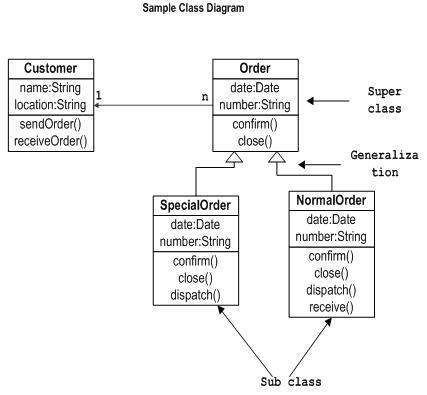
The following diagram is an example of an Order System of an application. It describes a particular aspect of the entire application.
- First of all, Order and Customer are identified as the two elements of the system. They have a one-to-many relationship because a customer can have multiple orders.
- Order class is an abstract class and it has two concrete classes (inheritance relationship) SpecialOrder and NormalOrder.
- The two inherited classes have all the properties as the Order class. In addition, they have additional functions like dispatch () and receive ().
The following class diagram has been drawn considering all the points mentioned above.
Write short notes on:
a. Agile development
b. Decision tree
a. Agile development
b. Decision tree
a) Agile Development
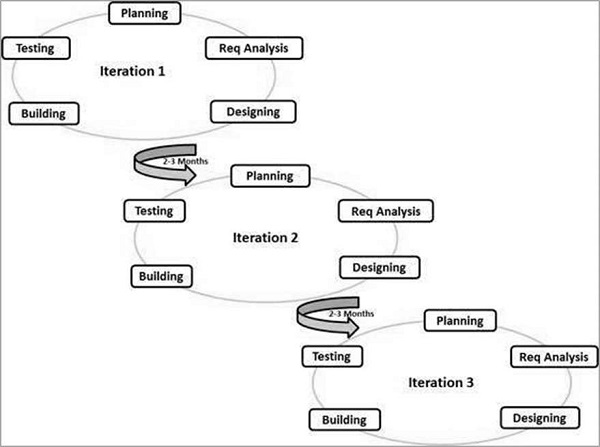
Agile SDLC model is a combination of iterative and incremental process models with focus on process adaptability and customer satisfaction by rapid delivery of working software product. Agile Methods break the product into small incremental builds. These builds are provided in iterations. Each iteration typically lasts from about one to three weeks. Every iteration involves cross functional teams working simultaneously on various areas like −
- Planning
- Requirements Analysis
- Design
- Coding
- Unit Testing and
- Acceptance Testing.
At the end of the iteration, a working product is displayed to the customer and important stakeholders.
Here is a graphical illustration of the Agile Model −
b) Decision Tree
Decision trees are a method for defining complex relationships by describing decisions and avoiding the problems in communication. A decision tree is a diagram that shows alternative actions and conditions within horizontal tree framework. Thus, it depicts which conditions to consider first, second, and so on.
Decision trees depict the relationship of each condition and their permissible actions. A square node indicates an action and a circle indicates a condition. It forces analysts to consider the sequence of decisions and identifies the actual decision that must be made.
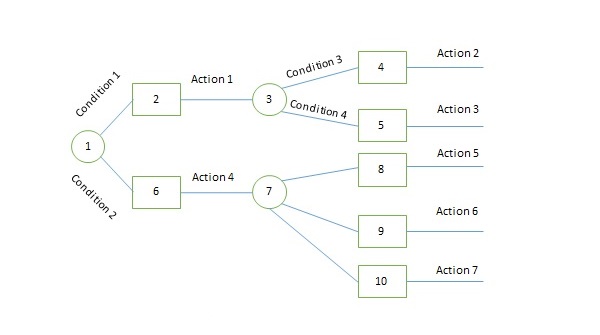
The major limitation of a decision tree is that it lacks information in its format to describe what other combinations of conditions you can take for testing. It is a single representation of the relationships between conditions and actions.
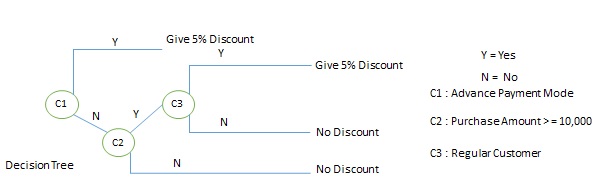
For example, refer the following decision tree −